SmartRotate Build for macOS

OPENAI & CLAUDE QUOTA · macOS

Your AI quota.
In your menu bar.

Know how much you have left before your next prompt. Check your OpenAI and Claude quota from the menu bar — click for each account’s limits and reset times.

macOS 14+ · Native SwiftUI · Open source

Just checking quota? No local proxy required.

QUOTA AT A GLANCE
Your menu bar summarySmartRotate’s native gauge icon and 74% remaining quota
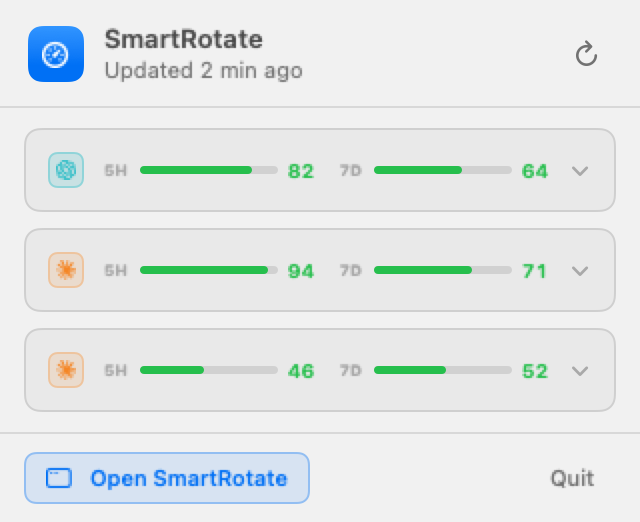
SmartRotate’s native macOS popover: refresh button, three compact account rows with 5H and 7D quota bars, and Open SmartRotate and Quit buttons.
Rendered from SmartRotate’s SwiftUI views.
Sample accounts and quota · light appearance.
QUOTA FOR YOUR CONNECTED ACCOUNTS
OpenAI Codex / ChatGPTAnthropic Claude

One account or several.

01 / QUOTA FIRST

A quick check.
Not another dashboard.

Leave the main window closed. SmartRotate stays in your menu bar, with the account details there when you need them.

AT A GLANCE

Remaining session quota.

The menu bar shows average remaining 5-hour quota for the included accounts with session data. With Smart Rotate on, it follows accounts enabled for rotation; with rotation off, you choose which accounts appear in the summary. It is not a combined allowance or a guarantee that every account has room.

ONE CLICK

Check each account’s limits.

Open the popover for compact 5H and 7D quota bars. Expand an account in the app for remaining percentages, reset times, available model windows, and any fetch errors.

IN THE BACKGROUND

Updated, without another tab.

Quotas refresh every five minutes, or just after the next known reset, whichever comes first. You can also refresh manually in the app. These are fetched values, not a live token counter.

02 / OPTIONAL, WHEN YOU NEED IT

Track your quota.
Then choose to rotate.

Quota tracking works on its own. If you also want to route a coding agent through your accounts, enable the local proxy in the main window and configure your client to use it.

What Smart Rotate actually does

It selects an account per provider for the local proxy, considering the tightest quota window and when it resets. You can exclude accounts or turn rotation off.

It does not switch accounts in the ChatGPT or Claude websites, add quota, or bypass provider limits. The “IN USE” badge shows SmartRotate’s selection, not which account served the last request.

Read the practical details

A FEW GOOD QUESTIONS

The details,
without the fine print.

Is SmartRotate free?

SmartRotate is open source under the MIT license. Your OpenAI and Anthropic accounts remain subject to their own plans, limits, and terms. SmartRotate does not provide an AI subscription or extra quota.

Where do my credentials go?

The app stores OAuth tokens in your macOS Keychain. While the local proxy is running, tokens are also exported to private, permission-restricted CLIProxyAPI auth files. Agent requests go directly from that local process to your provider, not through a SmartRotate server. The app has no telemetry.

Does rotation mean unlimited usage?

No. Your provider limits still apply. Smart Rotate chooses an eligible account using its tightest quota window and reset time. If all eligible accounts are below the headroom floor, it hands them to the proxy’s own cooldown and failover handling.

What do I need to run it?

macOS 14 or later and an OpenAI or Claude account. The current setup is a source build using Xcode 16+ and XcodeGen. The optional local proxy downloads CLIProxyAPI on first start. Installed widgets require a valid Apple Developer Team and properly signed App Group entitlements.

Is this an official OpenAI or Anthropic app?

No. SmartRotate is an independent project, not affiliated with, endorsed by, or sponsored by OpenAI or Anthropic. Provider names are used to identify supported accounts. OAuth use is subject to each provider’s terms.

START WITH ONE ACCOUNT

Put your quota
where you can see it.

Build SmartRotate, connect an OpenAI or Claude account, and check your menu bar. Leave the proxy off if all you need is quota tracking.

Source checkout required · macOS 14+
No public download is linked on this page.
Build from the source checkout
brew install xcodegen
xcodegen generate
xcodebuild -project SmartRotate.xcodeproj \
  -scheme SmartRotate -configuration Debug \
  -destination 'platform=macOS' \
  -derivedDataPath .build/xcode \
  CODE_SIGNING_ALLOWED=NO build
open .build/xcode/Build/Products/Debug/SmartRotate.app

Requires Xcode 16+. Run from the repository root. This unsigned local build does not enable installed widgets.